What do you need to know
Estimating cloud costs comprehensively involves a combination of cloud provider calculators, third-party tools, and in-house monitoring. Future-proof your cost estimation by regularly revisiting your cloud usage and leveraging tools that provide insights into cost optimization and scalability. With careful planning and monitoring, you can manage cloud costs effectively while supporting growth.
Here’s a streamlined guide to cloud cost estimation with essential points, techniques, and tools:
Compute Costs: Consider instance types, configurations, serverless options, and usage patterns.
Storage Costs: Include data storage types (object, block, archival) and data transfer fees.
Network Costs: Account for data transfer within the cloud, between regions, and to the internet.
Database Costs: Evaluate managed services, performance needs, and storage for databases.
Scaling & Flexibility: Plan for auto-scaling, peak load times, and elasticity requirements.
Licensing & Support: Include licensing fees, premium support, and compliance costs.
Security & Monitoring: Factor in additional services for security, compliance, and real-time monitoring.
Techniques for Cost Estimation
1. Historical Usage Analysis
2. Predictive Analysis
3. Rightsizing
4. Cost Optimization Strategies
5. Scaling Strategies.
Below are list of some tools you can use for estimates( not in priority order, just pick any based on your need).Using these key points and tools will help you gain a clear and accurate estimation of cloud costs, tailored to your specific needs and growth patterns.
1. Cloud Provider Calculators:
• AWS Pricing Calculator: AWS Pricing Calculator
• Google Cloud Pricing Calculator: Google Cloud Calculator
• Azure Pricing Calculator: Azure Calculator
2. Third-Party Cost Management Tools:
• CloudHealth by VMware: Offers multi-cloud cost tracking and optimization.
• Cloudability: Helps manage cloud spend, rightsizing, and optimization.
• Spot by NetApp: Provides cost savings by managing Spot Instances.
• Flexera: Tracks and optimizes cloud costs with detailed reports and forecasting.
3. Monitoring and Optimization Tools:
• AWS Cost Explorer, Azure Cost Management, Google Cloud Monitoring: Track usage patterns, set budgets, and receive alerts for cost spikes.
4. FinOps Resources:
• FinOps Foundation (finops.org): Offers best practices and tools for financial management of cloud spending.

Here’s a simplified cloud cost estimation example based on simple API structure
Scenario Breakdown
1. API Hosting on AWS: 30 APIs hosted on AWS, handling 1 million requests daily.
2. Document Storage on Mainframe: Documents are stored in a mainframe system, accessed by the APIs.
3. Oracle Connectivity: The system connects to an on-premise Oracle database for transactions and logging.
4. Mainframe Connectivity: Connects to the mainframe to fetch PDFs and send them to an online system.
Cost Estimation Components
1. Compute Costs (API Hosting on AWS)
• AWS Lambda (for serverless API execution) or EC2 Instances (for containerized API hosting):
• If using AWS Lambda: 1 million requests daily (~30 million per month).
• Lambda costs: Assume each request takes around 100ms, and Lambda is allocated 512MB of memory.
• Cost estimation: Approx. $15 per million requests + data transfer fees.
• If using EC2 Instances:
• Use instances sized based on API performance needs (e.g., t3.medium for moderate load).
• Cost estimation: Around $50–$100/month per instance, scaling as needed.
2. Data Transfer Costs
• Inbound data (free) for requests coming into AWS.
• Outbound data to external systems (like Oracle or online system):
• For 1 million requests daily, estimate ~1TB of monthly outbound data.
• Cost estimation: ~$90 per TB for data transfer out to the internet.
3. AWS API Gateway Costs
• To manage 30 APIs with 1 million daily requests.
• Cost estimation: Approx. $3.50 per million requests for REST API on API Gateway.
• Total for API Gateway: ~$100/month.
4. Oracle Connectivity (On-Premise)
• VPN or Direct Connect for secure connection between AWS and the on-premise Oracle database.
• Direct Connect can be a fixed cost, typically around $0.03 per GB of data transferred.
• Cost estimation: ~500GB per month transferred between Oracle and AWS = ~$15/month.
5. Mainframe Connectivity & Data Processing
• S3 Storage for Temporary Files (if PDF files are temporarily stored in AWS S3 before sending to the online system).
• S3 Standard Storage: Assume ~100GB/month (depends on frequency and file size).
• Cost estimation: Around $2.30/month for storage, additional costs for data transfer.
6. Monitoring and Logging
• AWS CloudWatch: Monitor API performance, logs, and transaction monitoring.
• Cost estimation: ~$10–$20/month based on log volume and metrics.
Summary of Estimated Monthly Costs
Component Estimated Cost (Monthly)
Compute (Lambda or EC2) $15–$100
Data Transfer (Outbound) ~$90
API Gateway ~$100
Oracle Connectivity ~$15
S3 Storage (Temporary PDF Files) ~$2.30
Monitoring (CloudWatch) ~$10–$20
Total Estimated Cost $232–$327
Here are some key Considerations
• Scaling Needs: If request volume increases, Lambda costs and data transfer costs may scale proportionally.
• Reserved Instances: If using EC2 instances, consider Reserved Instances for predictable workloads to save costs.
• AWS Free Tier: For new projects, take advantage of the AWS Free Tier for Lambda and S3 in the first 12 months.
This example provides a ballpark monthly estimate of $232–$327, assuming consistent traffic and data transfer. Real costs could vary based on additional usage, data volume, and any optimizations applied.
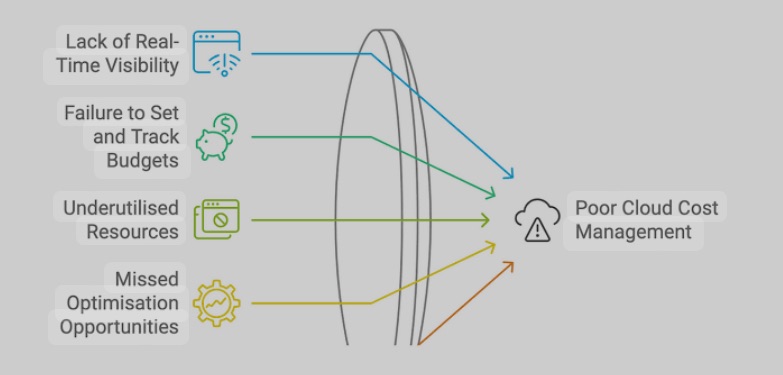
Teams often struggle with accurate cloud cost estimation and frequently encounter unexpected cost overruns or “spills” due to a variety of factors. Here are some key areas where teams fail to anticipate and estimate effectively, leading to significant challenges in cost management:
Underestimating Traffic and Usage Growth
• Cause: Teams often base their estimates on initial usage data or assumptions, failing to account for scaling needs as the application gains popularity or usage spikes.
• Impact: When traffic increases unexpectedly, it leads to higher compute, storage, and data transfer costs, resulting in significant cost overruns.
• Solution: Use predictive analysis and historical data to forecast growth and incorporate buffer estimates for scaling needs.
Misjudging Data Transfer Costs
• Cause: Many teams overlook the high costs associated with data transfer, especially when dealing with multi-region setups or integrations with on-premise systems.
• Impact: Data transfer between cloud regions, on-premise databases, or to external users can quickly add up, often blindsiding teams with unexpected costs.
• Solution: Carefully analyze data flow and understand transfer costs, especially for high-volume applications. Minimize cross-region transfers and consider optimizing data retrieval strategies.
Ignoring Storage Costs and Access Patterns
• Cause: Teams frequently overlook the differences in storage classes (e.g., hot vs. cold storage) and fail to assess access frequency for stored data.
• Impact: Storing infrequently accessed data in high-performance storage can lead to unnecessary costs. Additionally, frequent data retrievals from archival storage can incur unexpected retrieval fees.
• Solution: Classify data based on access patterns and use cost-effective storage options. Optimize data lifecycle policies to move data to cheaper storage classes over time.
Underestimating Scaling and Auto-Scaling Costs
• Cause: Teams often assume scaling is automatic and overlook the costs associated with auto-scaling, especially in dynamic environments.
• Impact: Costs can increase exponentially as resources automatically scale during peak loads, without adequate budget planning.
• Solution: Define scaling limits and set budget alerts to prevent unchecked scaling. Regularly monitor scaling configurations and optimize auto-scaling thresholds.
Not Factoring in Licensing and Third-Party Services
• Cause: Teams sometimes ignore licensing fees for third-party software, premium cloud services, or databases (like managed Oracle or SQL Server) when calculating costs.
• Impact: Licensing and service fees can constitute a significant portion of cloud costs, and failing to account for them can lead to budget overruns.
• Solution: Always include licensing and third-party service costs in initial estimates. Explore alternatives (e.g., open-source databases) to reduce dependency on expensive software where feasible.
Overlooking the Cost of Monitoring, Logging, and Security
• Cause: Teams may underestimate or overlook the cost associated with monitoring tools (e.g., CloudWatch), logging (e.g., CloudTrail), and security services (e.g., firewalls, encryption).
• Impact: Cloud providers charge based on log volume, number of metrics, and frequency of monitoring, which can quickly add up, especially in complex applications.
• Solution: Set appropriate logging levels and retention policies, and choose cost-effective monitoring solutions. Regularly review and fine-tune logging to avoid excessive data storage and retrieval costs.
Failing to Right-Size Resources
• Cause: Teams often over-provision resources or stick with default instance sizes rather than tailoring resource allocations to actual usage.
• Impact: Over-provisioned resources lead to wasted costs, while under-provisioned resources can affect performance, prompting expensive reactive scaling.
• Solution: Regularly review resource usage and right-size instances based on performance needs. Use rightsizing recommendations from cloud providers to optimize resources continuously.
Neglecting Long-Term Cost Commitments (Reserved Instances, Savings Plans)
• Cause: Many teams rely solely on on-demand instances, unaware of the potential savings from Reserved Instances or Savings Plans for predictable workloads.
• Impact: Failing to take advantage of cost-saving options leads to higher costs for steady-state workloads.
• Solution: For workloads with predictable usage patterns, leverage Reserved Instances or Savings Plans to save costs over long-term commitments.
Lack of Continuous Monitoring and Cost Management
• Cause: Teams may treat cost estimation as a one-time exercise rather than an ongoing process, failing to monitor and adjust costs regularly.
• Impact: Without continuous monitoring, even minor changes in usage can lead to unnoticed cost increases that accumulate over time.
• Solution: Implement real-time monitoring, set cost alerts, and review usage regularly to detect any unexpected costs early. Use cost management tools like AWS Cost Explorer, Azure Cost Management, or third-party solutions like CloudHealth.
Ignoring FinOps Practices and Collaboration with Finance
• Cause: Many tech teams don’t involve finance departments in cloud cost estimation, missing out on budgeting expertise and financial accountability.
• Impact: This can lead to inadequate budgeting and poor cost governance, causing unexpected expenses that finance may not anticipate.
• Solution: Adopt FinOps practices to bring finance and tech teams together for better cloud financial management. Establish budgeting guidelines, forecast costs jointly, and build financial accountability.

Cloud cost overruns commonly occur because teams underestimate growth, misjudge hidden costs, and fail to adjust resources dynamically. By considering these potential pitfalls and implementing strategies for continuous monitoring, cost optimization, and right-sizing, teams can reduce unexpected cloud expenses and improve the accuracy of cost estimation.
 Live Bold !!
Leave a comment