Automate middleware systems in a robust, future-proof way, you’ll want to adopt a layered and modular approach that covers both API and functional testing. Here’s a structured guide:
1. Define Your Scope and Requirements
- Understand the System: Identify all exposed APIs, internal integrations, and business logic. Document the endpoints, protocols (REST, SOAP, etc.), and any middleware components.
- Test Objectives: Define what you’re testing—unit, integration, system, and regression—and the quality criteria (performance, security, reliability).
2. Choose the Right Tools and Frameworks
- API Testing:
- RestAssured: Ideal for testing REST APIs with a fluent Java DSL.
- Postman/Newman: Can be integrated for API validations if you prefer a GUI-first approach.
- Functional Testing:
- JUnit/TestNG: Standard testing frameworks that integrate well with Java systems.
- Cucumber: For Behavior-Driven Development (BDD), helping non-technical stakeholders understand tests.
- Selenium (if UI is involved): Although middleware usually focuses on backend, if there’s a UI layer, Selenium can help automate end-to-end scenarios.
- Other Considerations:
- WireMock or Mockito: For simulating downstream or upstream services during integration tests.
- Allure or ExtentReports: For comprehensive test reporting.
3. Design a Modular and Scalable Test Framework
- Layered Architecture: Separate tests into unit, integration, and end-to-end layers. This makes it easier to maintain and scale.
- Data-Driven Testing: Utilize parameterized tests and external data sources (like CSV, JSON, or databases) so your tests can adapt to new scenarios without major code changes.
- Reusable Components: Create libraries for common functions (authentication, logging, setup/teardown routines) so updates to these components propagate easily.
- Configuration Management: Externalize configurations (URLs, credentials, environment-specific data) using properties files or environment variables to support multiple test environments.
4. Future-Proof Your Testing Strategy
- Adopt Continuous Integration (CI/CD): Integrate your tests into a CI pipeline (using tools like Jenkins, GitLab CI/CD, or CircleCI) to ensure they run on every build or code change.
- Version Control and Code Reviews: Store your test code in a version control system (like Git) and enforce code review practices to maintain quality.
- Scalability and Parallel Execution: Leverage frameworks’ capabilities (TestNG’s parallel execution, JUnit 5’s concurrency) to run tests concurrently, reducing feedback cycles.
- Adaptability: Write tests with abstraction layers so that if the underlying technology or requirements change, you only need to update your core libraries rather than every individual test.
5. Implementation Best Practices
- Automated Test Suites: Regularly run your suites as part of your build process to catch regressions.
- Documentation: Maintain clear documentation for your test framework, including how to add new tests, update configurations, and troubleshoot issues.
- Collaboration: Involve developers, testers, and stakeholders early in designing the test framework to ensure it meets cross-functional needs and is adaptable to future requirements.
6. Learn more about Mockito
Mockito is a powerful and flexible Java mocking framework that greatly simplifies the creation of isolated unit tests. By allowing you to simulate the behavior of external dependencies, Mockito enables you to focus on testing the business logic of your classes without having to worry about the complexity or unpredictability of external systems.
Benefits of Using Mockito
1. Isolation and Decoupling
- Focus on Unit Testing: Mockito lets you replace actual dependencies (like databases, web services, or even other classes) with mocks, ensuring that your tests only validate the behavior of the code under test.
- Reduced Flakiness: By isolating tests from external systems, you eliminate dependencies on network conditions, database availability, or other unpredictable factors, which leads to more stable tests.
2. Improved Test Readability and Maintenance
- Fluent API: The intuitive and readable API of Mockito makes it easy to understand the setup and expectations of your tests.
- Clear Verification: Mockito allows you to explicitly verify that specific methods were called on your mocks, making it clear what interactions are expected.
3. Efficient Development with TDD
- Supports Test-Driven Development (TDD): By mocking dependencies, you can write tests even before the actual implementations are complete. This encourages a design focused on contracts and behavior.
- Rapid Feedback: With fast, isolated tests, you receive quick feedback on your changes, which speeds up the development cycle.
4. Flexibility and Versatility
- Wide Use Cases: Mockito is suitable for unit testing service layers, controllers, data access objects (DAOs), and even components in event-driven or asynchronous systems.
- Handling Complex Scenarios: It can simulate exceptions, capture arguments, and work with void methods, giving you fine-grained control over testing various scenarios.
- Integration with Other Tools: Mockito seamlessly integrates with popular testing frameworks such as JUnit and TestNG, as well as with CI/CD pipelines, making it an essential part of any robust testing strategy.
How and Where to Use Mockito
In Middleware Systems
Middleware systems often integrate multiple services, databases, or external APIs. Using Mockito, you can simulate these interactions without needing the actual services available, which is crucial during development and continuous integration.
- Service Layer Testing: When testing a service that orchestrates multiple backend calls, you can use Mockito to mock the external dependencies, ensuring that your service logic is tested in isolation.
- Controller and API Testing: In web applications, controllers often rely on service layers. By mocking these services, you can test the controller logic (like request handling and input validation) without worrying about the underlying business logic.
- Data Access Testing: When testing DAOs, Mockito can simulate database interactions. This helps in verifying how your application behaves under different database responses, such as successful queries, no data found, or exceptions.
Beyond Basic Unit Testing
Mockito is not only useful for basic unit tests; its advanced features extend its application to more complex testing scenarios:
- Simulating External Dependencies: For middleware that interacts with third-party APIs or microservices, Mockito can simulate different responses, including errors and exceptions, to test your application’s resilience.
- Testing Asynchronous Code: Although primarily designed for synchronous operations, Mockito can be adapted to test asynchronous behavior by simulating callbacks or using futures.
- Capturing Arguments: With its argument captor feature, you can inspect the parameters passed to methods, ensuring that the data flow through your application is as expected.
- Verifying Interactions: Mockito lets you verify the order and number of method calls, which is particularly useful in scenarios where the sequence of operations matters.
Detailed Code Examples
Suppose you have a service that fetches data from an external source. Here’s how you might test it:
public class DataService {
private final ExternalService externalService;

public DataService(ExternalService externalService) {
    this.externalService = externalService;
}

public String processData(String input) {
    // Fetch data from an external system
    String fetchedData = externalService.fetchData(input);
    return fetchedData + " processed";
}
)
Using Mockito with JUnit 5:
@ExtendWith(MockitoExtension.class)

public class DataServiceTest {
@Mock
private ExternalService externalService;

@InjectMocks
private DataService dataService;

@Test
public void testProcessData() {
    // Arrange: Stub the method to return a controlled value
    when(externalService.fetchData("input")).thenReturn("mockData");

    // Act: Call the method under test
    String result = dataService.processData("input");

    // Assert: Validate output and verify interactions
    assertEquals("mockData processed", result);
    verify(externalService).fetchData("input");
}
}
Testing Void Methods and Exception Scenarios
For void methods and simulating exceptions:
public class NotificationService {
public void sendNotification(String message) {
// Simulate sending notification logic
}
}
public class UserService {
private final NotificationService notificationService;
public UserService(NotificationService notificationService) {
    this.notificationService = notificationService;
}

public void notifyUser(String user) {
    // Business logic leading to notification
    notificationService.sendNotification("Hello " + user);
}
}
Test for the above using Mockito:
@ExtendWith(MockitoExtension.class)
public class UserServiceTest {
@Mock
private NotificationService notificationService;

@InjectMocks
private UserService userService;

@Test
public void testNotifyUser() {
    // Act: Call the method under test
    userService.notifyUser("Alice");

    // Assert: Verify the void method was called with the expected parameter
    verify(notificationService).sendNotification("Hello Alice");
}
}
Using Argument Captors
Argument captors allow you to capture and assert the arguments passed to mocked methods:
@ExtendWith(MockitoExtension.class)
public class DataServiceCaptorTest {
@Mock
private ExternalService externalService;
@InjectMocks
private DataService dataService;
@Captor
private ArgumentCaptor stringCaptor;
@Test
public void testProcessDataWithCaptor() {
// Arrange: Stub the mock to return a controlled value
when(externalService.fetchData(anyString())).thenReturn(“capturedData”); // Act: Call the method under test dataService.processData("captorTest"); // Assert: Capture and verify the argument passed to fetchData verify(externalService).fetchData(stringCaptor.capture()); assertEquals("captorTest", stringCaptor.getValue());
}
}
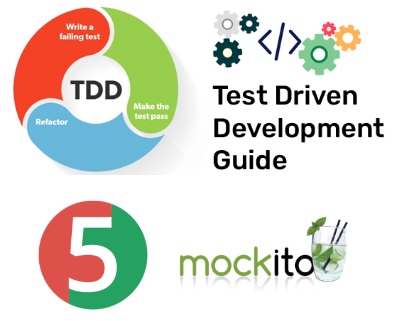
Test Driven Development (TDD) is where tests are written before the production code. This approach helps clarify requirements, drives design decisions, and ensures your codebase remains testable, maintainable, and robust over time. The typical TDD cycle follows these steps:
- Red: Write a test for the desired functionality, which fails because the feature isn’t implemented yet.
- Green: Implement the minimal amount of code required to make the test pass.
- Refactor: Clean up the code, ensuring that the test continues to pass, and improve the design or performance without altering its behavior.
Incorporating Mockito with TDD
Mockito is a powerful mocking framework that fits naturally into the TDD workflow by allowing you to simulate and control the behavior of external dependencies. This is especially useful when the code under test depends on components that aren’t fully implemented, are resource-intensive, or are outside the scope of unit testing (such as databases, web services, or complex business services).
How Mockito Enhances TDD
- Isolation of Units: When you write tests before coding, you often need to simulate interactions with external systems. Mockito helps create stand-in objects (mocks) that isolate the unit under test.
- Faster Feedback: With Mockito, you can simulate complex behaviors quickly, ensuring that your tests run fast and provide immediate feedback on your code changes.
- Design-Driven Development: By writing tests that expect specific interactions (using stubbing and verification), you’re encouraged to design your code with clear interfaces and loose coupling, which in turn makes the code easier to maintain and extend.
Example: TDD with Mockito
Imagine you’re developing a simple service that depends on an external math service. In a TDD approach, you’d start by writing a test that defines the behavior of your service.
Step 1: Write a Failing Test (Red)
Create a test that defines the expected behavior of your service. Here, we assume there’s a dependency on a MathService:
@ExtendWith(MockitoExtension.class)
public class CalculatorServiceTest {
@Mock
private MathService mathService; // External dependency

@InjectMocks
private CalculatorService calculatorService; // Class under test

@Test
public void testAdd() {
    // Arrange: Stub the external dependency to return an expected value
    when(mathService.add(2, 3)).thenReturn(5);

    // Act: Call the method under test
    int result = calculatorService.add(2, 3);
// Assert: Verify the result and that the interaction occurred as expected
        assertEquals(5, result);
        verify(mathService).add(2, 3);
    }
}
In this test, we’re using Mockito to create a mock for MathService and instructing it to return 5 when its add method is called with 2 and 3.
Step 2: Implement Minimal Code (Green)
Now implement just enough functionality in the CalculatorService to pass the test:
public class CalculatorService {
private final MathService mathService;
public CalculatorService(MathService mathService) {
    this.mathService = mathService;
}

public int add(int a, int b) {
    // Delegate to the external service (which is mocked during tests)
    return mathService.add(a, b);
}
}
And define the MathService interface:
public interface MathService {
int add(int a, int b);
}
After this implementation, the test should pass.
Step 3: Refactor
Once the test passes, refactor your code if necessary to improve readability, performance, or design while ensuring that the tests continue to pass.
Benefits of This Approach
- Immediate Feedback: By writing the test first, you get immediate feedback on your implementation, ensuring that every piece of code is necessary and tested.
- Better Design: Dependencies are clearly defined through interfaces. Using Mockito to simulate these dependencies forces you to design your code to be loosely coupled and easily testable.
- Documentation: The tests themselves serve as living documentation for how your classes and methods are expected to behave.
- Flexibility: As requirements change, updating tests first ensures that you don’t inadvertently break functionality, and mocks can be adjusted to simulate new behaviors.
By integrating Mockito into your TDD process, you not only enforce good testing practices but also drive a design that is robust, maintainable, and ready for future enhancements.
Mockito brings a wealth of benefits to your testing strategy:
- It promotes isolation and decoupling, allowing for robust unit tests.
- It enhances readability and maintenance by providing clear and concise API methods.
- It is an invaluable tool for TDD, facilitating rapid feedback and cleaner design.
- It is versatile enough to be used in testing various layers of an application, from controllers and services to DAOs and middleware integrations.
Focusing on modular design, using robust and flexible tools, and integrating your tests into an automated CI/CD pipeline, you create a test automation environment that is not only comprehensive today but also agile enough to incorporate future testing scenarios and technological shifts.
 Live Bold !!
Leave a comment